Servmon – No Metasploit

So I fired off AutoRecon (written by Tib3rius) and after it was done, this is what nmap found:

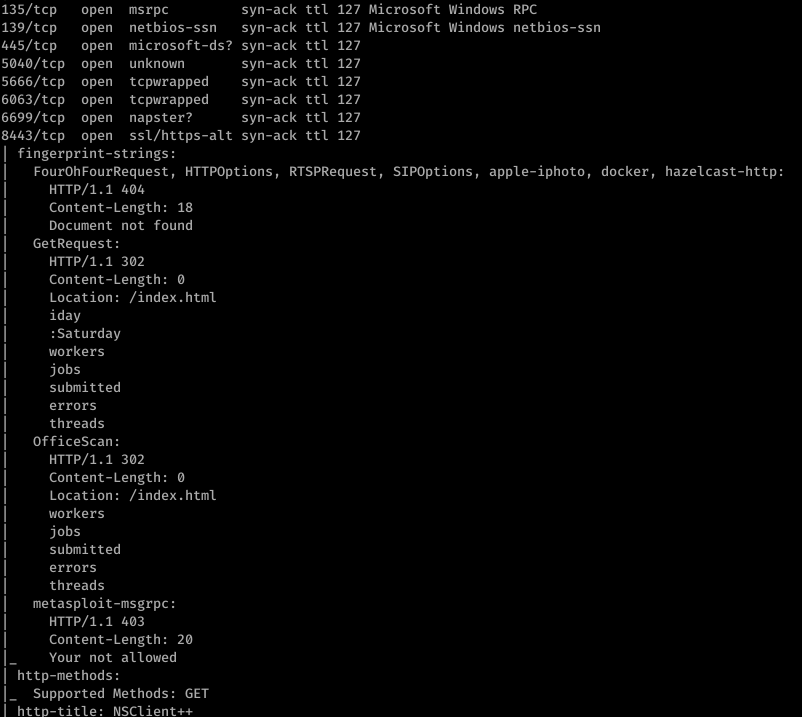
135/tcp 
139/tcp 
445/tcp 
5Ø4Ø/tcp 
5666/tcp 
6Ø63/tcp 
6699/tcp 
8443/tcp 
open 
open 
open 
open 
open 
open 
open 
open 
msrpc 
netbios-ssn 
microsoft-ds? 
unknown 
tcpwrapped 
tcpwrapped 
napster? 
ssl/https-alt 
syn 
syn 
syn 
syn 
syn 
syn 
syn 
syn 
-ack 
-ack 
-ack 
-ack 
-ack 
-ack 
-ack 
-ack 
127 Microsoft Windows RPC 
127 Microsoft Windows netbios-ssn 
127 
127 
127 
127 
127 
127 
fingerprint-strings : 
FourOhFourRequest, HTTPOptions, RTSPRequest , 
HTTP/I.1 
Content-Length: 18 
Document not found 
GetRequest : 
HTTP/I.1 302 
Content-Length: 
Location: / index. html 
i day 
: Saturday 
workers 
jobs 
submitted 
errors 
threads 
OfficeScan : 
HTTP/I.1 302 
Content-Length: 
Location: / index. html 
workers 
j obs 
submitted 
errors 
threads 
metasploi t-msgrpc : 
HTTP/I.1 403 
Content-Length: 20 
Your not allowed 
http-methods: 
Supported Methods: GET 
httD-tit1e: NSC1ient++ 
SIPOptions, apple-iphoto, 
docker , 
hazelcast-http:

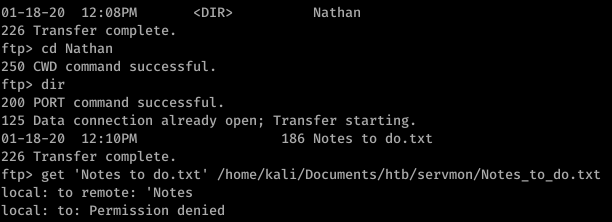
Alright, well let’s start with ftp. After getting anonymous access to ftp, I found this:

125 Data 
01-18-20 
01-18-20 
connection 
12 : 06PM 
12 : 08PM 
already open; 
Transfer starting. 
Nadine 
Nathan
01-18-20 12: 08PM 
226 Transfer complete. 
ftp> cd Nathan 
250 CWD command successful. 
ftp> dir 
200 PORT command successful. 
Nathan 
125 Data connection already open; Transfer starting. 
01-18-20 12: IOPM 
226 Transfer complete. 
ftp> get 
local: to 
local: to: 
186 Notes to do. txt 
' Notes to do. txt' txt 
' Notes 
remote: 
Permission denied
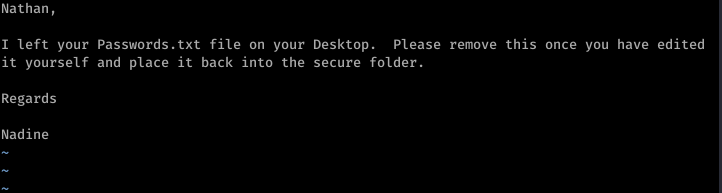
Nathan , 
I left your Passwords . txt file on your Desktop. 
Please remove this once you have edited 
it yourself and place it back into the secure folder. 
Regards 
Nadine

So that’s a hint that Passwords.txt is a file under Nathan’s username. Using basic knowledge of Windows file system mapping, we can guess at where exactly this file is. Something like C:\Users\Nathan\Desktop\Passwords.txt maybe?

Enumerating further, we find that Port 80 runs something called NVMS. Let’s look on Searchsploit for nvms:

kaliöhyd3 . —"Downloads$ searchsploit nvms 
Exploit Title 
NVMS 
løøø - 
Directory 
Traversal 
Path 
(/usr/share/exploi tdb/) 
exploi ts/hardware/webapps/47774. txt

Before we go to trying to exploit this… let’s continue properly enumerating. Port 8443 has something called NSClient++ running on it.

kaliöhyd3 . —"Documents/htb/servmon$ searchsploit NSC1ient 
Exploit Title 
NSC1ient++ 0.5.2.35 - 
Privilege 
Escalation 
Path 
(/usr/share/exploi tdb/) 
expl oi ts/windows/l oca1/46802. txt

Okay so we have a priv esc possibility in our back pocket.

Firing off burp, we use the directory traversal to see if anything good comes of that guess on Passwords.txt’s location

Sweet. Now doing a bit of research, we can also find the location of the file that contains the password for NSClient++. It’s in a file called nsclient.ini. Reading this file, we get another password

However, it looks like we can only log into this from the “allowed host” of 127.0.0.1.

Trying to use the list of passwords found in Passwords.txt with nadine and SSH, we eventually get in with username: nadine and password: L1k3B1gBut7s@W0rk

Now that we’re in, let’s focus on our initial hunch of using NSClient++ to priv esc. First, we use plink.exe to set up a port forward via SSH

Now this took a bit of messing around with, but eventually what I did was uploaded nc.exe into temp and created a bat file to return a reverse shell.

The WebUI was pretty difficult to understand how to work so I ended up reading documentation and using the API to put the script rev.bat onto the box

To trigger the script, I then booted up the WebUI and ran scripts\ex\rev.bat in the console

On our listener, we get an NT AUTHORITY\SYSTEM shell

HTB – Optimum Box Walkthrough [No Metasploit]

This is an awesome box… pretty straight forward up to user, but but definitely got caught up in a few things that I’ll be sure to never do again… and getting root was not so easy… you definitely learn a lot with this box… wget scripting for windows… windows priv esc tools… anyway let’s get started.

First, let’s get an Nmap scan done:

Ok so only port 80 is open… a little more enumeration will show that the website is running on Rejetto…

I typically only like to use exploit-db’s stuff (searchsploit runs off exploit-db in case you didn’t know)

An exploit search yields:

The code shows the usage:

So after you download the file, copy it into a new folder… edit the script accordingly…

The directions also say you need to copy nc.exe from your system… make sure you copy the right one (not the sql one)

Then serve it all up on a web server

Run the script…

Then look at your nc -nvlp window…. You’re in kostas. Get your user flag.

Priv Esc to Root

Ok… full disclosure, this took me QUITE a while to figure out, but I was determined to not use Metasploit

After looking at systeminfo, googling windows privilege escalation tools, etc., I came across https://resources.infosecinstitute.com/windows-exploit-suggester-an-easy-way-to-find-and-exploit-windows-vulnerabilities/

After I saw it was vulnerable to MS16-098 and looking around the web… a lot… I came across this little bad boy:

And this is where I pulled a super noob move and wasted hours. First, I downloaded the file directly and tried to compile it… guess what… you can’t directly compile a C file in a Linux environment.

I then tried downloading the binary directly through my browser… which constantly resulted in a 0 byte file… very frustrated I went to go get a beer and take a break.

I came back, used plain old git in terminal… and voila!

Move the file to the folder where you’re serving up SimpleHTTP on!

So now I’m wondering… how am I gonna get this .exe onto the victim machine? wget won’t work because we’re in a windows environment…

Make wget script for windows (I had to google how to do this)

Use the wget script you made earlier to move the .exe onto the victim machine…

Moment of truth… this .exe better work… lol

Run it…. And BOOM! You should get root.